
AI / News & analysis
Google updates spam guidance for shared pages and publishing tools
Google’s 26 October update explicitly covers user-created pages and web apps. What changed, why it matters, and how an AI-app preview illustrates the difference between sharing and search discovery.
THE NEWS
Google expands spam guidance for shared pages and publishing tools
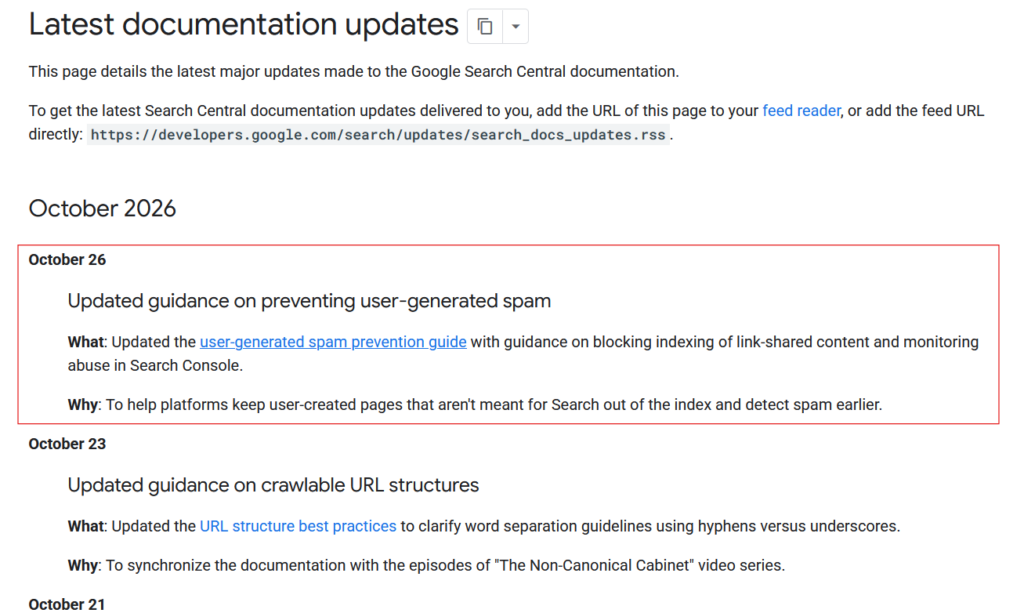
Google updated its user-generated spam prevention guidance on 26 October 2026, explicitly covering tools that let users publish shared pages, generated content and web apps.
The update adds advice on keeping link-shared content that is not meant for Search out of the index and monitoring platform abuse through Search Console. Google records the change in its documentation changelog.
What Google changed
Google’s 26 October changelog points to clearer advice on link-shared content and Search Console monitoring. The updated guide explicitly includes publishing tools, not just traditional comment forms.
It asks operators to distinguish pages intended for public discovery from those used for sharing, collaboration or utility. It also recommends watching for unusual activity, such as a few accounts producing many indexable URLs.
Added guidance: separate sharing from search discovery
Google added this guidance for services that generate shareable pages:
If your service lets users create shareable pages, generated outputs, or interactive tools, consider whether that content is meant to be found through search engines or only accessed directly by people with a link.
For sharing, collaboration or utility pages that are not intended for public discovery, Google recommends default indexing or crawl controls. I would choose the control according to the intended outcome; the noindex and robots.txt distinction below matters when implementing it.
Added monitoring: spot unusual activity earlier
The guide asks operators to verify their site in Search Console, watch for manual-action or security alerts, and review indexing and performance reports. It also adds this monitoring advice:
Track platform-level creation and indexing metrics, and set up alerts for anomalies such as spikes in newly published public pages or a small number of users generating a large share of indexable URLs.
Google also recommends monitoring creation patterns, including cases where relatively few accounts produce many indexable pages. These are signals to investigate, not automatic proof of spam or confirmation of a new enforcement campaign.
Who should pay attention?

Platform owners
Run a forum, website builder or AI tool with public sharing? Check which user-created URLs search engines can access and how suspicious publishing is handled.

People using those tools
Check what “share” and “publish” actually do. A link sent to a colleague and a page intended to attract customers have different purposes.

Business-site owners
Focus on places where others can add content or generate public pages. This is not a reason to hide useful service pages or assume all AI-assisted writing is spam.
My insight: generating a page and publishing it for Search should be separate decisions
The important point for me is the responsibility of the publishing platform. If a tool makes it easy to produce public URLs at scale, it also needs a way to decide what deserves public discovery and to identify abuse. A share button should not silently turn every unfinished output into a search result.
A shared AI-app preview is not automatically a search page
A perfect example would be an AI app builder that lets someone generate a booking-app prototype and share it with a client. The preview is hosted on the tool’s own domain. Its purpose is to let the client test the app—not to attract visitors from Google.
01 · GENERATE
Create an app preview
The user generates a working prototype on the AI platform.
02 · SHARE
Send a client the link
The client opens it to test the app and give feedback.
03 · CONTROL
Decide if Search needs it
Keep a sharing-only preview out of Search; review a finished public app separately.
For a preview intended only for direct sharing, I would check that the platform applies an appropriate indexing control by default. If the user later wants a finished app discovered through Search, that should be a deliberate publishing decision, with its content and access settings reviewed.
The distinction: a preview is not spam simply because it was made with AI. This guidance concerns pages that were not intended for Search. Producing low-value pages primarily to manipulate rankings is a separate issue covered by the existing scaled content abuse policy.
Three controls that do different jobs
Noindex
Controls indexing: tells Google not to include the page in Search.
robots.txt
Controls crawling: limits which URLs Googlebot can fetch. It is not an access lock.
Access protection
Controls access: use authentication or permissions for confidential content.
Important: Google must be able to fetch a page to read its noindex directive. Blocking that fetch in robots.txt can prevent this. See Google’s noindex documentation. For separately hosted pages, confirm who controls the actual host: robots.txt rules have a host, protocol and port scope.
Does this mean new manual actions are coming?
There is already discussion about what this could mean for AI platforms. But Google’s update does not announce a new wave of manual actions.
My advice: check your setup, but don’t assume a drop in traffic means you have been penalised. Check the Manual Actions report in Search Console first. If Google has taken a manual action, that report will tell you.
What should you check now?
- Platform and AI-tool owners: Check whether shared pages become indexable automatically. Keep pages intended only for sharing out of Search, and monitor Search Console for unusual growth or alerts.
- People using these tools: Before sharing or publishing, check the visibility settings. A shareable link does not make a page private; use access controls for confidential content.
- Business website owners: Review comments, profiles and other areas where users can publish. Moderate suspicious activity and investigate unexpected indexed URLs.
My recommendation is simple: decide what deserves to appear in Search before your platform starts generating pages at scale.