
Local SEO / Practical guide
Your Google Business Profile gets views but few enquiries: what to investigate
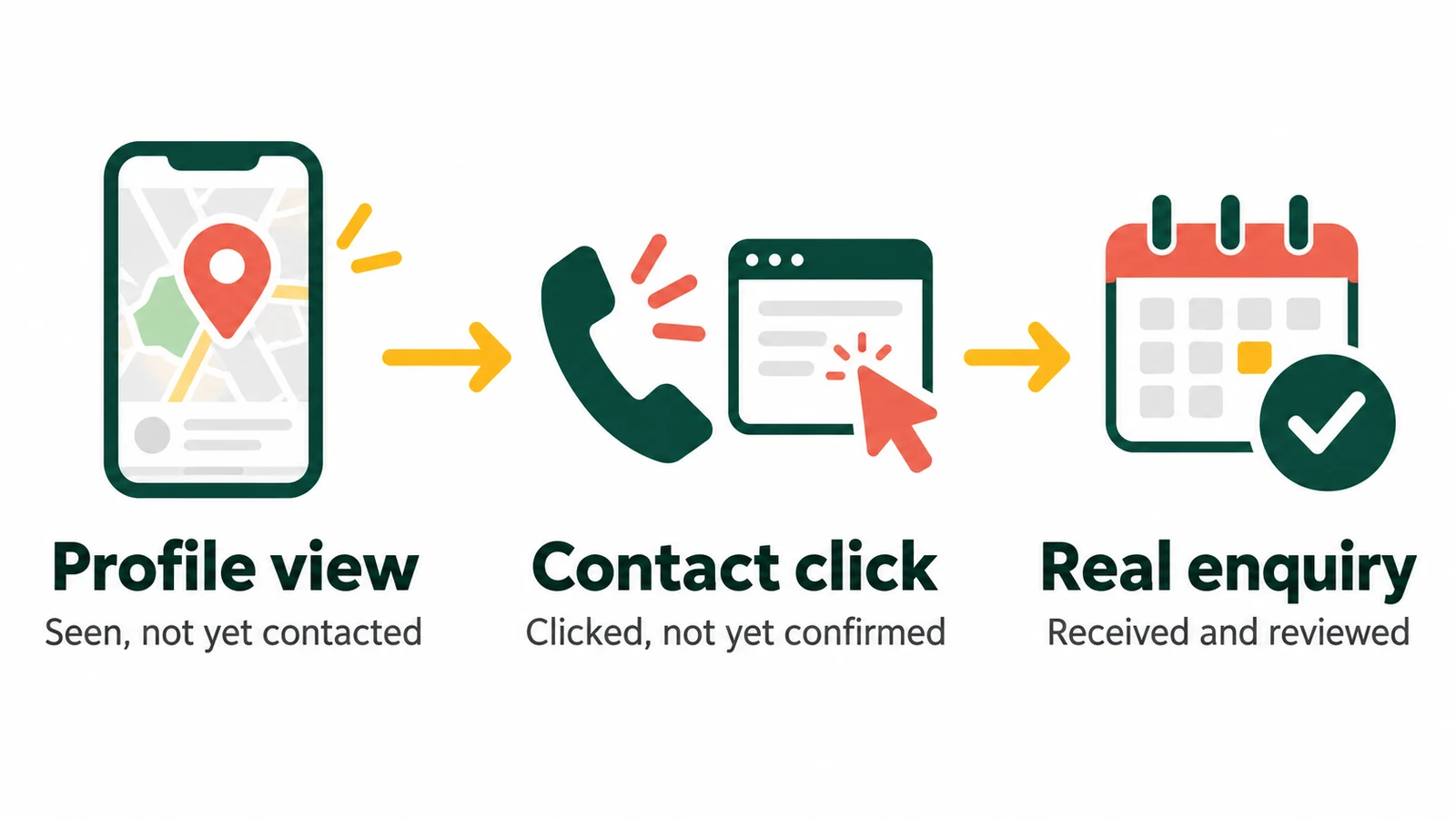
Profile views are not enquiries. I would check the service, the contact route and the follow-up before recommending more visibility.
More views will not fix a phone nobody answers
If an owner shows me a profile report with rising views and a quiet diary, my first question would not be how often they post on Google. I would ask what they mean by an enquiry, where those enquiries arrive and who checks them.
A repair shop might get walk-ins. An appointment business might need bookings. A consultant might need a short conversation before quoting. The same view count can mean very different things to those businesses.
I would work backwards from the customer you want: the service they need, the information they check and the route they use to make contact. This guide covers that investigation. If the problem is that relevant people cannot find you at all, start with the separate Google Maps visibility guide. My local SEO work connects profile information, service pages and the route to an enquiry.
1. Check what the report is actually counting
Start with the same profile and date range. Note any advertising, closures or seasonal changes. Google’s performance report can include organic and paid activity, so do not label the whole total as unpaid SEO results.
Google defines profile views as people viewing the profile on Search and Maps, with counting limits. Its Calls metric counts call-button clicks, not connected conversations. Website clicks count clicks on the website link. Directions requests are not confirmed visits. Only applicable metrics appear. These definitions matter when comparing the report with your own records.
I would keep three records side by side, rather than squeeze everything into one conversion percentage.
| Record | What it helps you check | What it does not establish |
|---|---|---|
| Profile performance | Whether discovery and contact-button activity changed. | Whether every person became a customer. |
| Website and phone evidence | Whether visitors reached the right page and contact attempts arrived. | Whether every visit or call came from the profile. |
| Enquiry or booking log | Which requests were received, suitable and followed up. | A complete view of people who never made contact. |
For a small business, a simple weekly log is enough to start: date, requested service, source if known, whether you could help and the outcome. Keep personal details in your own secure system, not in a shared marketing screenshot.
If the website has no reliable tracking, leave the source unconfirmed. A neat-looking report is not worth inventing attribution. My analytics work can help establish what the existing setup can actually measure.
2. Give the right customer enough reason to choose you
If views are healthy but few people act, I would inspect the profile as a prospective customer. Can I tell whether this business does the job I need, serves my area and is available when I can contact it?
Service fit
Compare the searches available in Performance with the work you actually want. Separate brand searches, specific service needs and obvious mismatches. A broad phrase alone does not tell you whether someone was ready to buy.
Check whether the main category describes the real business and whether the relevant service is explained. Do not add unrelated categories or keywords to the business name just to widen exposure. More unsuitable enquiries create work, not growth.
Practical details
Check hours, special closures, phone number, actual location or service area, appointment requirements and the website destination. Make the profile and website agree. An old closing time or a booking link for the wrong branch can be enough to lose a suitable customer.
Reasons to trust the business
Use genuine photos that help someone recognise the place or understand the work. Read recent reviews for recurring questions or complaints. Are people unsure about access, waiting times, what is included or how to book? Answer those questions where they belong, rather than adding more promotional adjectives.
Ask customers for honest feedback without rewards or filtering out unhappy people. Do not manufacture reviews or imply qualifications the business cannot substantiate.
Where an old directory shows conflicting contact details, record the actual mismatch and who controls it. My citation and business-details cleanup service deals with those inconsistencies. It is not a reason to buy hundreds of listings when your existing details are already correct.
3. Follow the contact route on a real phone
Open the public profile, not just the management screen. With the business owner’s agreement, test the routes a customer would use. Mark test enquiries clearly so nobody counts them as leads.
Calls: does the right person receive them?
Check the displayed number, tap-to-call destination, business-hours routing and voicemail. Make an agreed test call and confirm it reached the right location. Ask the team how missed calls are handled and whether someone owns the callback.
Do not turn on recording or upload customer conversations just for a marketing report. Agree any tracking changes with the business and its privacy requirements first.
Website: does the next page help someone enquire?
Open the exact link on mobile. Check the final page after any redirect, whether it describes the expected service and whether the call or enquiry option is visible. A general homepage may be right; a relevant location page may be better. Choose the page that represents the actual business and helps this customer.
Test the form through validation, submission, confirmation and receipt by the team. A success message is not enough if the email never arrives. Include consent and security checks in the test; do not remove them to make the form appear easier.
Bookings: can someone complete the appointment?
Where bookings are offered, follow the link through to the correct service, location and available times. Check fees, availability and confirmation messages. Do not place chargeable bookings or occupy real appointment slots without an agreed test process.
If nothing can be booked for weeks, that may explain a quiet enquiry log better than a profile photo problem. Decide whether the business wants a waiting list, alternative service or clearer availability information.
For wider page-level checks, see the website traffic but no sales checklist. Here, keep the test tied to the route from the Business Profile.
4. Check what happens after contact
Ask the person answering the phone and the person reading the inbox, not only the person compiling the report. Were calls missed during busy periods? Did form messages go to an unmonitored address? Were the enquiries mostly for work you do not offer?
Use a few simple outcomes: suitable and contacted, suitable but not reached, unsuitable, duplicate or spam. Record why a request was unsuitable where you know it. Do not assume every lost enquiry was a marketing failure; price, availability and the customer’s plans can matter too.
A response-time problem needs an operational fix. A service mismatch needs clearer information or a review of the audience. An unmeasured journey needs tracking. I would not prescribe the same package for all three.
A workshop example: where I would look first
Consider a fictional bicycle workshop, ExampleLane Cycles. Its owner says the profile gets seen, but repair bookings are quiet. This is how I would investigate, not a client result.
- Read the customer requests. The team says several callers want a repair the workshop does not offer. Check how the service is described before trying to attract more of those calls.
- Open the profile’s website link. Suppose it lands on a general shop page, while repair booking is buried elsewhere. Make the repair route clear without hiding the retail business.
- Confirm receipt. An agreed test form submission shows a confirmation, but reaches an old inbox. Fix delivery and prove the team receives a fresh test.
- Review actual enquiries. After the repair, compare received repair requests and follow-up outcomes over comparable periods. Keep closures, busy weeks and any advertising changes in the notes.
The inbox repair is complete when receipt works. Whether more suitable bookings follow is a separate result to measure. If the phone and website already work, I would move back to service fit and the customer’s reasons to choose the workshop.
A useful plan for the next week
You do not need to rewrite the whole profile before learning anything. I would give the business and marketing team a small set of jobs.
First: establish the starting point
Save a comparable reporting period, list the contact routes and agree what counts as a suitable enquiry. Note known gaps rather than filling them with estimates.
Next: fix the confirmed failure
Test calls, forms and booking links. Assign the broken route to someone who can repair it, then repeat the test. Correct any verified mismatch in hours, services or location.
Then: review the enquiries
Ask the team what arrived, whether it was suitable and what happened next. Continue weekly, but wait for enough relevant activity before judging a trend.
If you use campaign parameters on the website link, keep a consistent naming convention and test that the final page still works. For example, use a distinct campaign name for each real location. Google’s campaign URL guidance explains the parameters. They help identify tracked visits; they do not recover every missing session or prove a later phone call’s source.
Do not change categories, photos, page content and tracking all at once unless there is a clear reason. Keep a dated change log so the next review can distinguish repairs, experiments and changes in demand.
Common questions about profile views and enquiries
Why does my Google Business Profile get views but no calls?
Views alone cannot identify the cause. Check whether the profile matches the services people want, whether the phone number and contact routes work and whether calls are being answered. Also compare profile call-button clicks with your own phone records.
Does the Calls figure mean someone spoke to my team?
No. Google’s Calls metric counts clicks on the profile’s call button. Check your phone system and team records to establish whether calls connected, were answered and concerned suitable work.
What is a good enquiry conversion rate for a profile?
I would not set a universal target. Businesses have different contact routes, buying cycles and tracking gaps. Agree the numerator, denominator and date range first, then compare your own suitable enquiries over comparable periods.
Should I post more or add more photos first?
Not if a confirmed contact failure is losing enquiries. Repair that first. Add useful, genuine photos or updates when they answer a customer’s question or reflect a real change, rather than treating activity volume as the objective.
What should I send for a profile review?
Send the public profile link, website, main service, service area and the problem you have noticed. A redacted performance summary can help later. Do not send passwords or customer records through the enquiry form.
Sources
Google’s reporting definitions and business-representation guidance were checked on 17 October 2026. Use the metrics available for your own profile; the investigation above is how I would connect them with the business’s contact and booking records.