
Meta Tags Checker
Check a page title, meta description, robots tags, canonical link and Open Graph tags. Inspect public page HTML and understand what to review next.
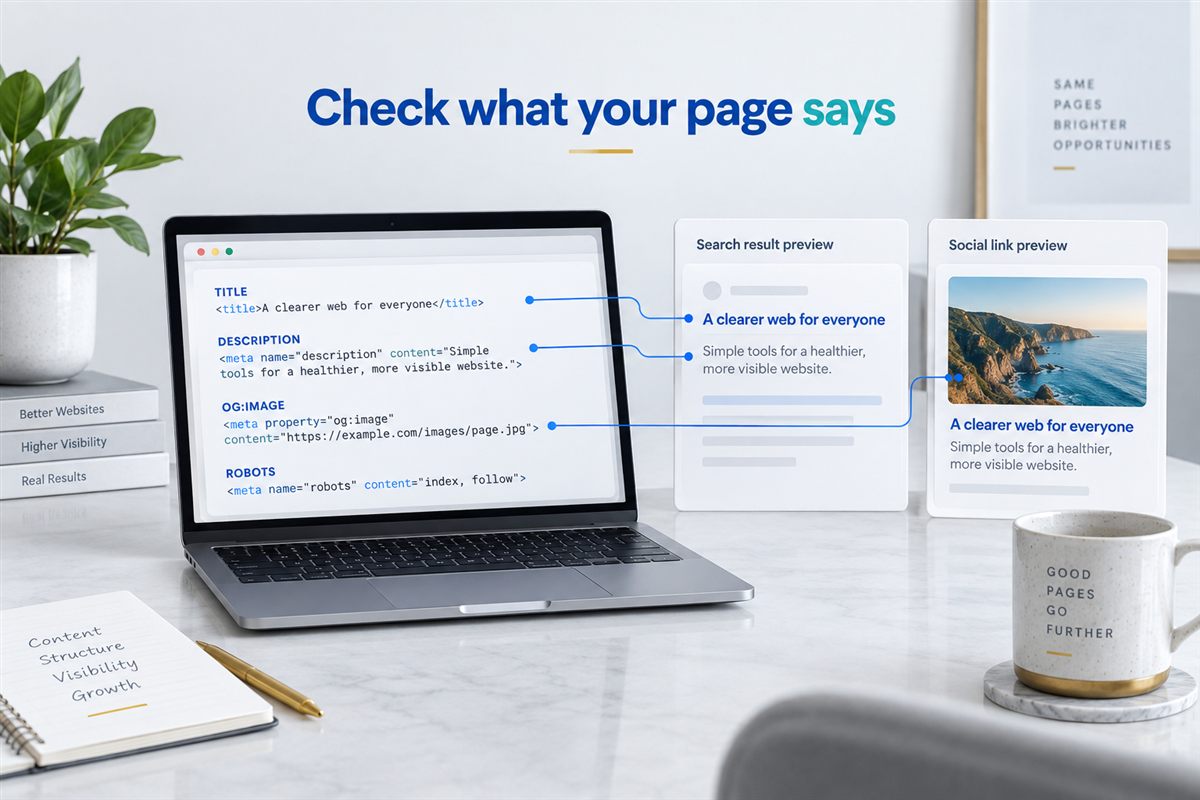
PAGE SOURCE, MADE READABLE
What does your page tell search engines?
The page you see and the metadata it returns are not always in agreement. Start with the source before rewriting the message.
HIMANSHU'S APPROACH
Check the promise, not just the character count
When I review a page, I want its title and description to explain the actual offer. A service page should not inherit a generic homepage description, and a product page should not advertise something the buyer cannot find.
This checker helps you inspect the source. It does not assign an arbitrary SEO score. Read the returned values alongside your page heading, content and intended audience, then decide what needs changing.
Six things worth checking
TITLE
Page identity
Does the title describe this specific page? Look for outdated offers, repeated brand names or a generic template title. The title element is included here even though it is not a meta tag.
DESCRIPTION
A useful introduction
Explain what visitors will find, in language they would recognise. A concise, accurate description is more useful than forcing keywords into a fixed character target.
ROBOTS
Indexing instructions
Watch for an unintended noindex directive after a launch. A missing robots meta tag does not prove indexability: HTTP headers, crawling access and other signals also matter.
CANONICAL
Preferred page URL
Check that the declared URL is intentional, particularly on filtered products, migrated pages and translated sites. A canonical link is a signal, not proof that Google selected that URL.
OPEN GRAPH
Shared-link identity
Review og:title, og:description, og:url and og:image together. Old campaign images or homepage text can make a shared product or service link misleading.
X CARDS
Social preview details
Check twitter:card and related title, description and image tags. This tool displays declarations; it does not fetch the image or guarantee a particular preview.
Turn findings into a focused edit
- Check the final public URL. Use the destination page, including HTTPS. Redirecting URLs are reported so you can enter the final address explicitly.
- Compare the values with the page. Check whether the title, description and social image describe the same offer. Repeated tags are shown on separate lines so you can spot plugin or template overlap.
- Edit the source, then retest. Update your CMS or template, clear relevant caches and run the check again. Search engines and social platforms may retain older information until they revisit the page.
Need help deciding what to change? Explore SEO consulting, ecommerce SEO or multilingual search strategy. If the domain itself cannot resolve, start with DNS Lookup.
Source inspection, not a ranking prediction
This tool reads the HTML returned to its server. It does not execute JavaScript, sign in, crawl your whole site, validate structured data or inspect robots.txt and HTTP indexing headers. It may receive different HTML from your browser, and some websites block automated requests.
For safety, only public HTTP or HTTPS pages on standard web ports are accepted. Responses must be HTML and fit within a 2 MB limit. Do not submit private links containing passwords, access tokens or personal information.
Metadata and AI discovery
Clear metadata helps describe a page, but it is not a switch for AI citations. A convincing title cannot replace a useful answer, accessible content or credible evidence. I treat metadata as one consistency check within the wider page review, not a promise of inclusion in an AI response.
For that wider work, see AI search services. This checker does not test whether an AI system has read, recommended or cited your page.
Meta tag questions
Why does Google show a different title or description?
Google generates title links from multiple signals and may use page content instead of your description for a particular query. This checker shows the source declarations, not a live Google search result.
Is there a perfect title or description length?
No single character count guarantees a complete display. Available space and the query can affect presentation. Write a specific, readable message and put the important information early.
Why are some tags missing?
The page may not declare them, may add them with JavaScript, or may return different content to automated requests. Check the browser source and rendered page before deciding a CMS setting is broken.
Does this check every page on my website?
No. It checks one submitted URL. Test representative service, product, category and article pages to find template problems, then use a wider crawl for a site-wide audit.
Can the checker fix my tags automatically?
No. It is read-only and has no access to your CMS. Make changes through your website settings or developer, then retest the public page.
Can you help resolve duplicate tags?
Yes. Duplicate output can come from a theme, SEO plugin or custom code. Share the affected page through the contact page so we can establish which source should control the metadata.
Further reading: Google's guidance on title links and search snippets.