
Technical SEO / Practical guide
PDF SEO Checklist: Make Useful Documents Easy to Find
How I review public PDFs for readable text, document structure, discoverability and the next step back to your business.
Decide whether the customer needs a PDF
A product specification, research report or printable checklist can work well as a PDF. A service page that needs frequent updates, mobile browsing and a contact form usually needs an HTML page first. I would not move useful website content into a download simply because a brochure looks polished.
For a manufacturer, I might keep the product explanation, compatibility summary and enquiry route on the product page, with the detailed specification available as a download. For a consultant, a short HTML summary can explain who a report is for before the reader opens it.
Google includes PDF among its indexable file types. That establishes a possibility, not a promise that every uploaded brochure will be indexed or attract relevant enquiries.
Prepare the text, structure and file properties
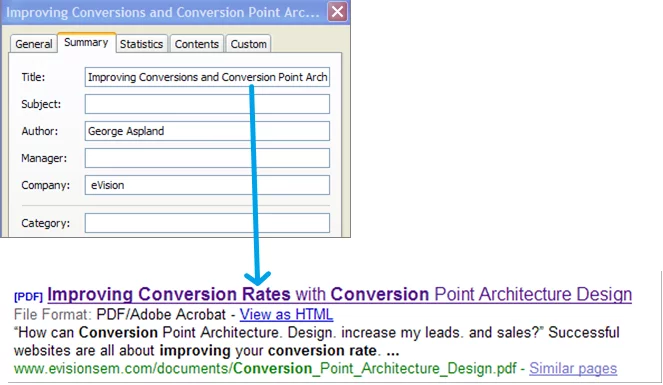
- Use a clear document title, not a working filename such as final-v7.
- Export selectable text; if using OCR on a scan, check the resulting text carefully.
- Use real headings and a sensible reading order in a tagged PDF.
- Provide useful alternative text for informative images.
- Include author or organisation details, a relevant date and the scope of the document.
- Compress large images without making labels or tables illegible.
I test a few paragraphs by copying them into a plain-text view and checking the order. This catches some problems, but it does not replace an accessibility review. A two-column report can look correct while its extracted text mixes unrelated sentences.
File properties and a visible title should agree. A file named commercial-kitchen-maintenance-checklist.pdf is more understandable to a reader than download02.pdf. Do not rename a widely linked document casually: plan the old URL’s replacement and update the links you control.
Publish it as part of a website journey
Link to the document with descriptive anchor text, and identify it as a PDF. Add file size where that helps mobile users decide whether to download. Keep the public URL stable and check that it returns the actual document rather than a login screen or a missing-file page.
Inside the PDF, provide a relevant next step back to your site. A specification should link to its product or enquiry page; a general report can link to a related explanation. Check those links after export. A printed URL that is not clickable can frustrate the reader on a phone.
Where the same substantial content exists in HTML and PDF, choose your preferred search destination. A developer can assess canonical HTTP headers for equivalent versions. If a document should be excluded from search, review an X-Robots-Tag response header; a PDF does not have an HTML head in which to place a robots meta tag.
Keep confidential and outdated material out of the journey
Before upload, review comments, tracked revisions, embedded attachments and document properties for information that should not be public. Search exclusion is not a privacy barrier. Restrict access to private files instead of hoping they remain undiscovered.
Give someone responsibility for updating or retiring public documents. An old price list may generate the wrong expectations long after a product page has changed. Keep genuinely historical reports clearly dated; replace operational documents when the current version makes them misleading.
I also inspect the mobile experience. If someone must repeatedly zoom and pan through a wide table just to find a key compatibility detail, put that answer on the HTML page. The download can still serve customers who need the full specification.
Measure the download and what happens afterwards
A download click is an interaction, not proof that the document was read. In analytics work, I distinguish the download event from an enquiry, purchase or qualified lead. Where practical, track the relevant links back from the document without putting personal information into URLs.
AI can help organise a document outline or identify inconsistent terminology. Technical claims, figures and extracted tables still need human checking. Do not assume that placing a report in PDF format makes it more likely to be cited by an AI system. Publish a clear HTML explanation of important findings and their context.
Use the navigation checklist to make the resource discoverable and the indexing guide when a public document is not appearing as expected.
Common questions
Should I replace every PDF with an HTML page?
No. Keep downloadable formats that customers genuinely use. I would provide an HTML explanation when the information is important to discovery or the buying decision.
Can a scanned PDF work?
It may be processed, but I prefer reliable selectable text and a checked reading order. OCR errors in product codes or technical figures can be particularly damaging.
Will a PDF download tell me someone read the report?
No. It tells you the tracked interaction happened. I measure subsequent useful actions separately and avoid treating every download as a lead.